
Step-by-Step Guide: Registering and Architecting Enterprise Cloud Hosting
Deploying hosting for enterprise applications requires a fundamental shift away from standard shared or VPS hosting frameworks. When handling mission-critical workloads—such as high-traffic ERP systems, financial transaction engines, or telemetry pipelines—you must architect for high availability, zero single points of failure (SPOF), and strict regulatory compliance (such as ISO/IEC 27001 or SOC 2). This blueprint walks through the concrete steps of registering, provisioning, and securing an enterprise-grade cloud hosting environment using AWS and Google Cloud Platform (GCP) as our baseline reference architectures.
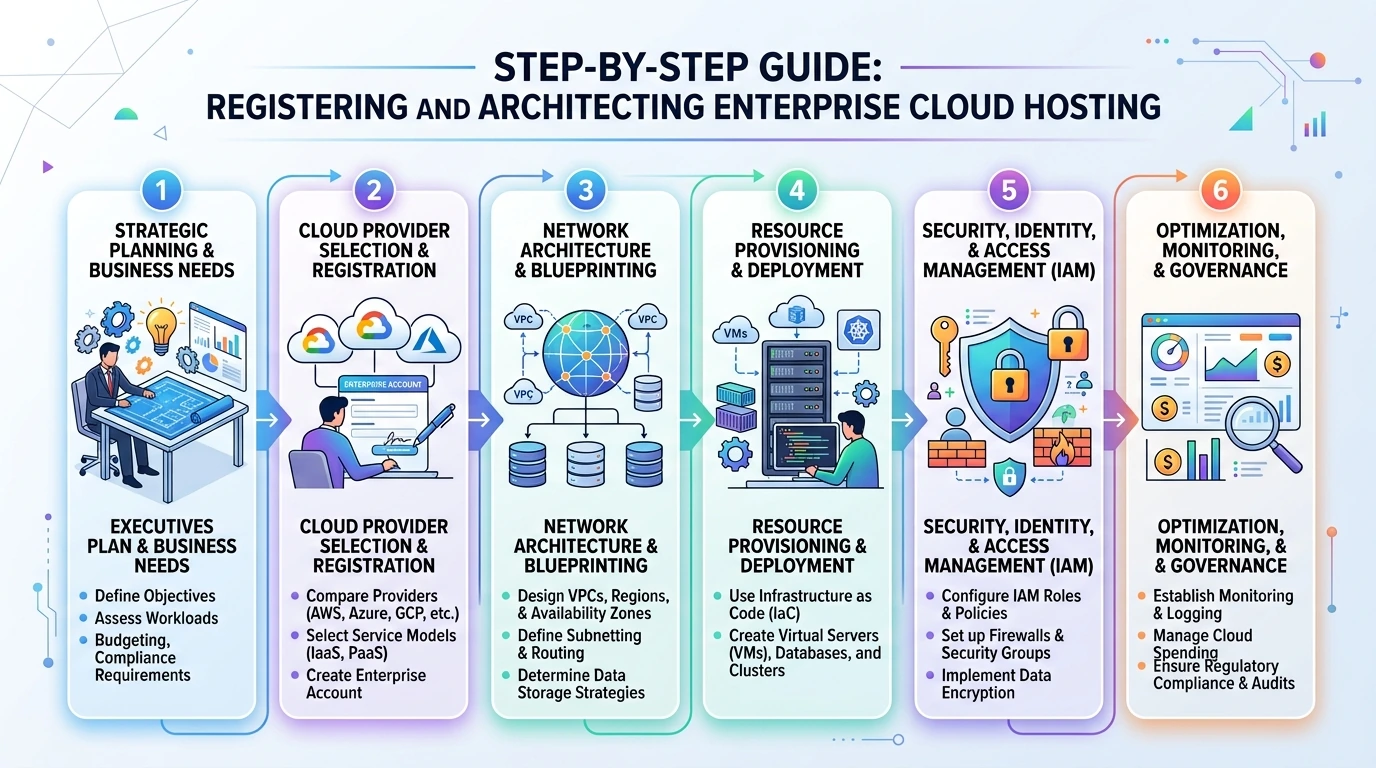
Prerequisites & Planning Checklist
Before initiating registration with a Tier-1 hyperscaler, ensure you have compiled the following technical assets:
- Enterprise Domain & DNS Zone: Access to your corporate domain registrar with DNSSEC capabilities enabled.
- CIDR Block Allocation Plan: A non-overlapping IP address schema (e.g.,
10.100.0.0/16) coordinate with your internal network team to prevent IP conflicts during future VPN/Direct Connect integrations. - Identity Provider (IdP) Integration: SAML 2.0 or OIDC details (e.g., Okta, Azure AD) for federated single sign-on (SSO).
- Hardware Security Module (HSM) Requirements: Decisions on whether your database encryption keys must reside in dedicated CloudHSM instances.
Step-by-Step Enterprise Registration & Provisioning
Step 1: Establishing the Root Organization & Billing Hierarchy
Never register an enterprise cloud account using a personal or single-employee email address. Always utilize a corporate distribution list (e.g., aws-root-admin@enterprise.com) protected by hardware-based Multi-Factor Authentication (MFA).
- Navigate to the cloud provider's enterprise registration portal (AWS Organizations or GCP Resource Manager).
- Create the Master Billing Account and configure consolidated billing. Link your corporate line of credit or invoicing agreement rather than a standard corporate credit card to avoid service interruptions due to card expiration.
- Define your Organizational Units (OUs). At a minimum, establish three distinct OUs:
Security,Core-Infrastructure, andWorkloads(subdivided intoStagingandProduction).
PRO WARNING: The Root Account Trap
Once the root account is configured, generate a 4096-bit RSA SSH keypair for initial setup, lock the root credentials in a physical secure vault, and strictly enforce IAM policies that forbid any day-to-day operations using the root login. All subsequent steps must be executed via IAM Identity Center roles.
Step 2: Designing the Virtual Private Cloud (VPC)
Your application must run within an isolated virtual network. For high availability, we will deploy across three distinct Availability Zones (AZs).
- Initialize your VPC with a
10.100.0.0/16CIDR block. - Subdivide this space into three tiers across three AZs:
- Public Subnets (3x):
10.100.1.0/24,10.100.2.0/24,10.100.3.0/24(Reserved exclusively for Application Load Balancers and NAT Gateways). - Private App Subnets (3x):
10.100.10.0/24,10.100.11.0/24,10.100.12.0/24(Where your compute instances, such as AWS EC2m6i.xlargeor GCPe2-standard-4, will reside). - Private Database Subnets (3x):
10.100.20.0/24,10.100.21.0/24,10.100.22.0/24(Strictly isolated for clustered databases like Amazon Aurora or Cloud Spanner).
- Public Subnets (3x):
- Deploy redundant NAT Gateways in each public subnet to allow private app instances to fetch security patches without exposing them to inbound internet traffic.
Step 3: Provisioning High-Availability Compute & Load Balancing
For enterprise workloads, we utilize an Application Load Balancer (ALB) paired with an Auto Scaling Group (ASG) to dynamically handle traffic spikes while maintaining a minimum of three active nodes for N+1 redundancy.
- Define a Launch Template specifying an enterprise-grade base image (e.g., Red Hat Enterprise Linux 9 or Rocky Linux 9). Configure the instance size to
m6i.xlarge(4 vCPUs, 16 GB RAM, 10 Gbps network throughput). - Configure the Auto Scaling Group to span your three Private App Subnets. Set the scaling policy based on target CPU utilization (e.g., scale out when average CPU exceeds 65% for 3 consecutive minutes).
- Create an Application Load Balancer in the Public Subnets. Configure an HTTPS listener enforcing TLS 1.3 with a secure cipher suite (e.g.,
ECDHE-ECDSA-AES128-GCM-SHA256). Direct traffic to your ASG target group.
Step 4: Setting Up the Enterprise Database Cluster
Never run enterprise databases on standard compute instances. Use managed, multi-AZ clustered database engines to guarantee automatic failover and point-in-time recovery.
- Provision an Amazon RDS PostgreSQL cluster using
db.m6g.xlargeinstances. - Enable Multi-AZ deployment. This automatically provisions an active primary database in AZ-A and a synchronous standby replica in AZ-B. Failover latency is typically under 35 seconds.
- Enable Storage Auto-Scaling with Provisioned IOPS (gp3 or io2) set to a baseline of 12,000 IOPS to eliminate disk I/O bottlenecks.
- Enforce Storage Encryption at rest using a customer-managed key stored in your Key Management Service (KMS).
Common Pitfalls & Critical Mistakes to Avoid
- Over-allocating Public IPs: Placing database or application servers directly in public subnets with
0.0.0.0/0ingress rules. Always route public traffic through the ALB and restrict application security groups to only accept traffic originating from the ALB's security group ID. - Ignoring DNS TTL Defaults: Leaving default DNS Time-to-Live (TTL) settings at 86400 seconds (24 hours). During a disaster recovery failover, clients will cache outdated IP addresses. Set your public DNS record TTLs to 60 or 300 seconds.
- Neglecting egress bandwidth costs: Enterprise applications transferring large volumes of uncompressed data between regions can incur massive data transfer charges. Always compress payloads and utilize VPC Endpoints (PrivateLink) to keep traffic within the provider's private backbone.
Post-Implementation Verification Checklist
Before routing live production traffic to your newly registered enterprise cloud hosting environment, execute this validation suite to confirm operational readiness:
- Inbound TLS Validation: Execute
curl -Iv https://your-enterprise-app.com. Verify that only TLS 1.3 is accepted and that older protocols (TLS 1.0, 1.1) are actively rejected with a handshake failure. - Multi-AZ Failover Simulation: Initiate a manual failover of your primary database instance via the cloud console. Verify that the application automatically reconnects to the newly promoted primary node within the target SLA (<40 seconds) without requiring a service restart.
- Network Isolation Audit: Attempt to SSH directly into an application instance in the Private App Subnet from an external IP address. Confirm the connection times out. Verify that access is only possible via an authorized SSH bastion host or Systems Manager Session Manager.
- Load & Latency Benchmarking: Run a distributed load test (e.g., using k6 or Apache JMeter) simulating 10,000 concurrent users. Verify that Time to First Byte (TTFB) remains under 150ms and that the Auto Scaling Group successfully provisions additional nodes when thresholds are breached.


Post a Comment for "Step-by-Step Guide: Registering and Architecting Enterprise Cloud Hosting"